- Only carrier portal native to D365 · WMS & TMS integrated
The only carrier portal natively built on Dynamics 365 — with direct integration into D365 Supply Chain Management's WMS and TMS.
Give your carriers the self-service portal they actually want — shipments, BOLs, appointments, and invoices, all powered by the same Warehouse and Transportation Management data your ops team already runs on. No middleware. No parallel TMS. No sync jobs.
- How it Helps
Why carrier-facing teams choose Carrier Portal
One portal, five modules, and a platform built to scale with your network — without tab-switching, spreadsheet exports, or Monday-morning reconciliations.
Cut check-call volume
Carriers self-serve status, docs, and appointments — so dispatch stops answering the same three questions all day.
Faster BOL turnaround
Carriers upload BOLs and PODs directly against a load. No email threads, no lost attachments, no “did you get my fax?”
Self-service appointments
Carriers request and confirm dock times in the portal. Your team handles exceptions, not the whole calendar.
Invoices, visible
Every invoice and payment status is one click away. Fewer AR calls, cleaner month-end, happier carrier partners.
Native to D365, not bolted on
Powered directly by your D365 Supply Chain Management WMS and TMS data — carrier views stay in sync with your ops team in real time, with no translation layer between them.
Built to scale with you
Scales elastically from a handful of carriers to your entire network — every page stays fast and searchable at any volume.
- Inside the portal
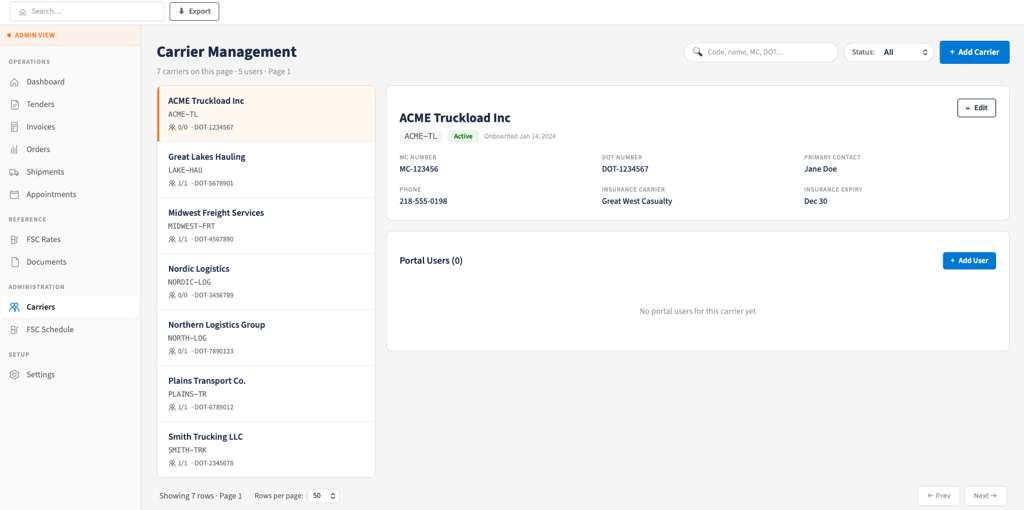
A look at every corner of Carrier Portal
- Platform & Scale
A platform that grows with your network
Tenant isolation
role‑based access in D365
activity logging
GDPR statement
- Proven at scale
Outcomes carrier ops teams actually measure
Deployed across enterprise carrier networks of every size. These are the operational improvements customers tell us about most often.
40%+
2×
70%
< 6 wk
- The difference
Not a shipping tool. Not a customer portal. The only carrier portal, natively built on D365.
Other products in the Dynamics 365 ecosystem solve adjacent problems — or solve them for someone else’s user. Carrier Portal is purpose-built for the people actually moving your freight, and it’s the only one that plugs directly into D365 Supply Chain Management’s Warehouse and Transportation Management modules.
What Carrier Portal isn't
A shipping execution tool
Multi-carrier rate engines and label printers automate your team's outbound shipping — they aren't a self-service portal your carriers log in to.
A customer or vendor portal
Microsoft's Customer Portal and typical vendor portals are built for buyers and suppliers. Carriers have a different workflow — shipments, BOLs, dock appointments, invoices.
A third-party TMS layer
External TMS platforms bolt onto D365 through middleware and duplicated data. Carrier Portal lives inside your stack — not on top of it.
What Carrier Portal is
The carrier portal that lives inside your Dynamics 365 environment — powered by your WMS and TMS data, not a copy of it.
- Purpose-built for carriers — not buyers, suppliers, or your ops team
- Native integration with D365 Supply Chain Management's Warehouse and Transportation Management modules
- No middleware, no parallel data model, no reconciliation jobs
- Five unified modules — shipments, documents, appointments, invoices, admin
∞
Scales with your carrier network
5
Modules, one unified portal
1
URL, one sign-on for every carrier
24/7
Real-time visibility for every team
- Core capabilities
Everything your carriers need, in one place
Five deeply-integrated modules, one sign-in, one data model. No tab-switching, no spreadsheet exports, no Monday-morning reconciliations.
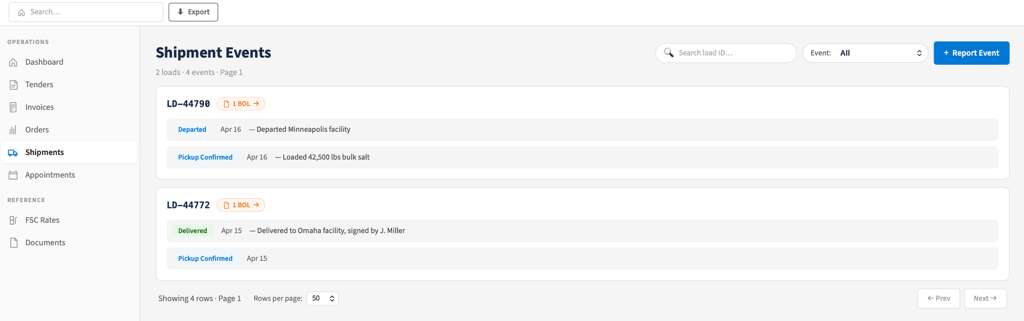
- Shipments
Real-time load visibility, from tender to delivery
- Filter by status, lane, customer, or date — and share what you're seeing with a single link
- Stays fast and searchable as your shipment volume grows
- Deep-link straight into matching Documents or Invoices, no export needed
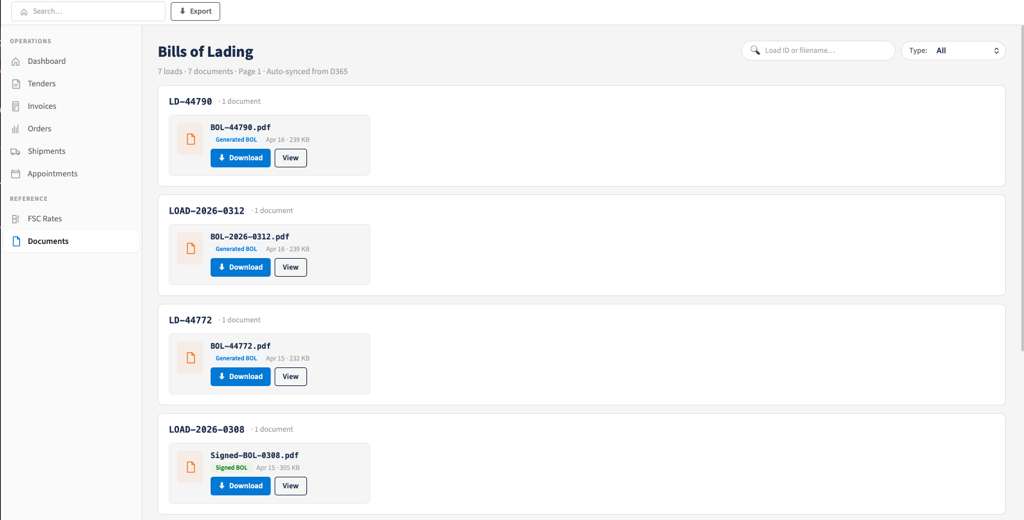
- Documents & BOLs
BOLs, PODs, and invoices — attached to the load, not an inbox
Carriers drop documents directly against the shipment. Your back-office works from a single source of truth, not scattered emails.
- Drag-and-drop upload for BOLs, PODs, weight tickets, customs forms
- One-click jump from any document back to its parent shipment or invoice
- Auto-linked to load ID, carrier, and customer
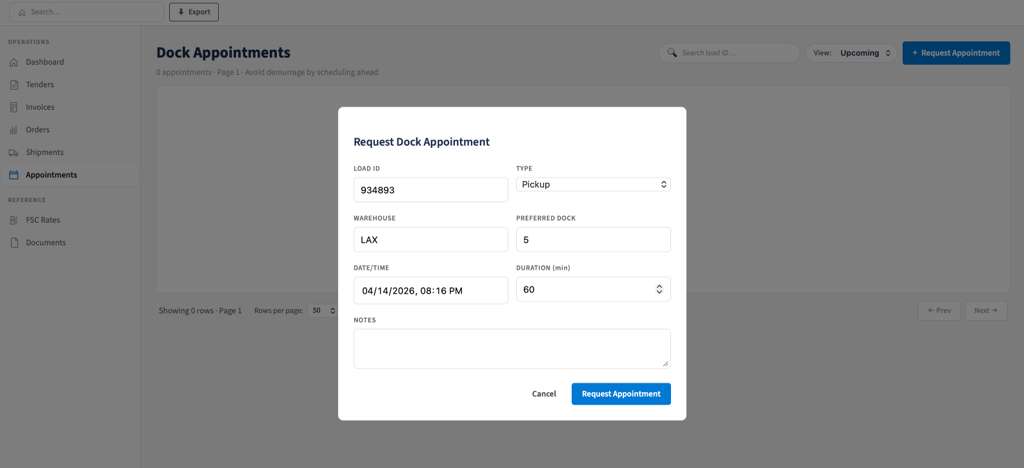
- Appointments
Self-service dock scheduling, without the phone tag
Carriers request and confirm appointment windows. Your ops team handles only exceptions — not the entire calendar.
- Dock availability respects location rules, blackouts, equipment types
- Appointment status surfaced on every Shipment record — no separate system
- Automated confirmations and reminders via email and portal
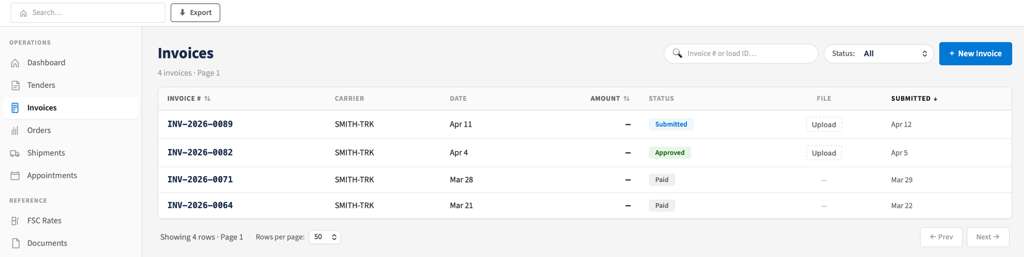
- Invoices
Invoice visibility that actually closes the loop
Carriers see every invoice, accessorial, and remittance status in real time — and drill straight to the backing load and documents.
- Invoice status, due date, and payment date in one view
- Filterable history keeps AR disputes down to minutes, not days
- Drill into line items, accessorials, and attached BOL / POD in one click
- Pricing & licensing
Built to fit your Microsoft licensing — not stack on top of it
Carrier Portal is designed from day one to slot cleanly into Microsoft’s external user model for Dynamics 365. Carriers connect as third-party partners covered under your existing D365 SLs, so the portal scales with your network without adding new per-user line items to your Microsoft footprint.
- How licensing works
Carriers are external users. Your D365 SLs already cover them.
Microsoft’s licensing model recognizes a clear distinction between internal users — your employees, contractors, and agents who require a Dynamics 365 SL — and external users: third-party companies, customers, and partners whose access is included with your existing internal user SLs. Freight carriers are separate companies running their own operations and their own fleets, which is the textbook external user scenario Microsoft’s licensing guide describes.
As your network grows, your IT team’s licensing position stays clean and predictable. Onboard your 10th carrier or your 10,000th — your existing D365 footprint covers the access either way, so adding carriers is a configuration change rather than a procurement project.
Predictable as you scale
The portal grows elastically with your carrier network — without volume tiers to renegotiate at year-end or capacity ceilings to plan around. Licensing cost stays steady; the value compounds.
Compliant by design
Architected to fit Microsoft's external user access framework and multiplexing guidance. Internal team members keep their D365 SLs; carriers access the portal as the third-party partners they are — exactly as the licensing model intends.
One Microsoft stack, one contract
Carrier Portal lives inside your existing Microsoft enterprise agreement and your D365 environment. No parallel SaaS bills, no separate licensing relationships — your IT team's footprint stays consolidated.
- FAQs
Questions from carrier ops and IT
Can’t find your answer? Our team will walk you through architecture, security, and rollout in a 30-minute call.
Please chat with our team.
What makes Carrier Portal different from other D365 shipping or portal products?
How does the licensing model scale as we onboard more carriers?
How does this stay compliant with Microsoft's licensing rules?
Do we host Carrier Portal, or does FRT Forge?
How is carrier access scoped — do they see other carriers' loads?
Will it scale as our carrier network grows?
How does Carrier Portal authenticate users?
Can we customize the portal?
How long does a typical deployment take?
Does it integrate with our TMS or ERP?
- Get In Touch With us
Ready to give your carriers a portal they'll actually use?
A 30-minute demo is enough to see how Carrier Portal fits into your D365 environment — and what a rollout would look like across your carrier network.