- SHP for Business Central
Shipping for Dynamics 365 Business Central
Pack orders, compare carrier rates, create labels, and apply freight charges—all inside Microsoft Dynamics 365 Business Central.
- How it Helps
Shipping Features for Business Central
Packing & Shipment Weight
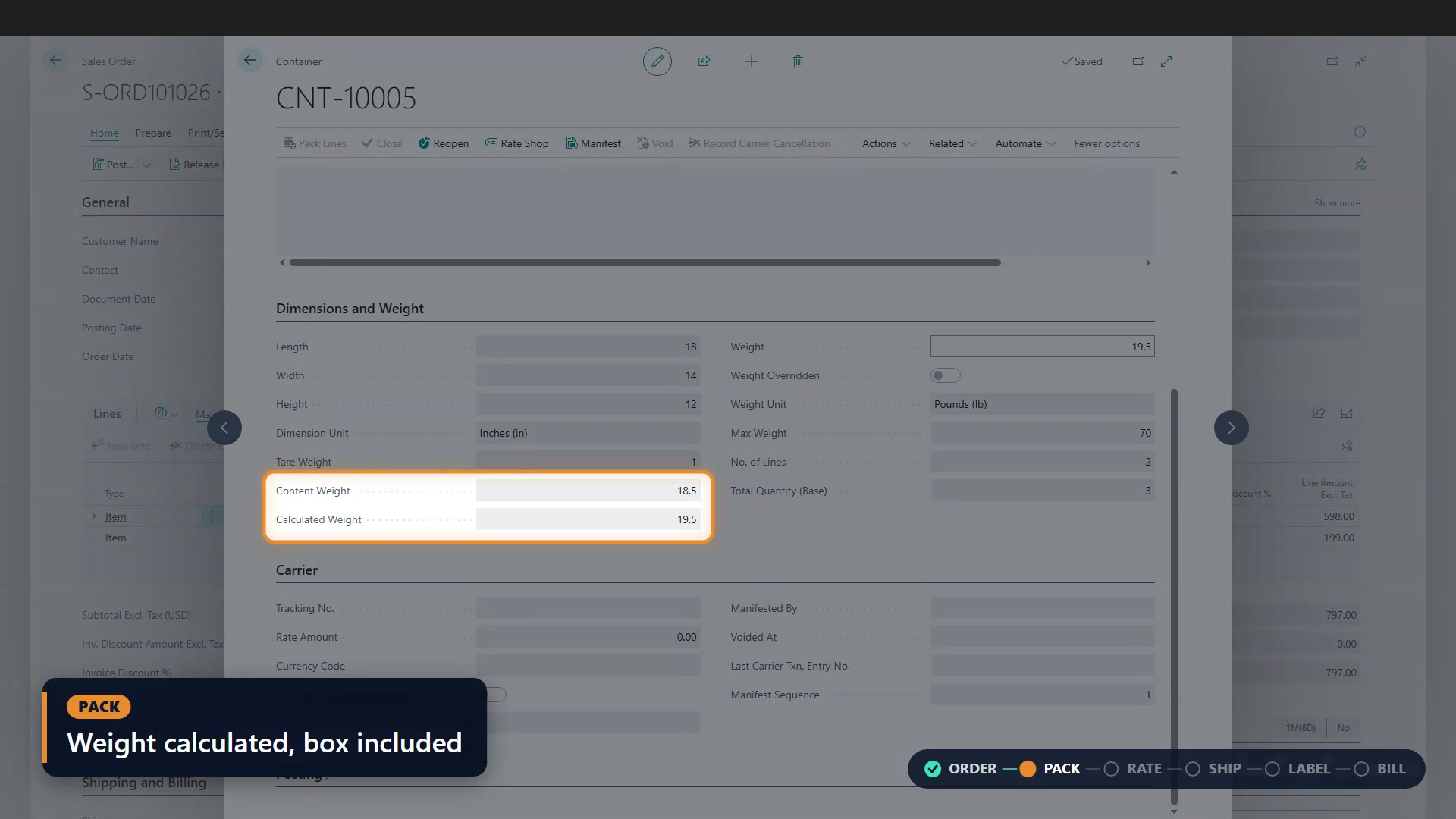
Pack from the sales order and calculate the shipment’s weight from its contents and the box, including tare weight.
Carrier Rate Comparison
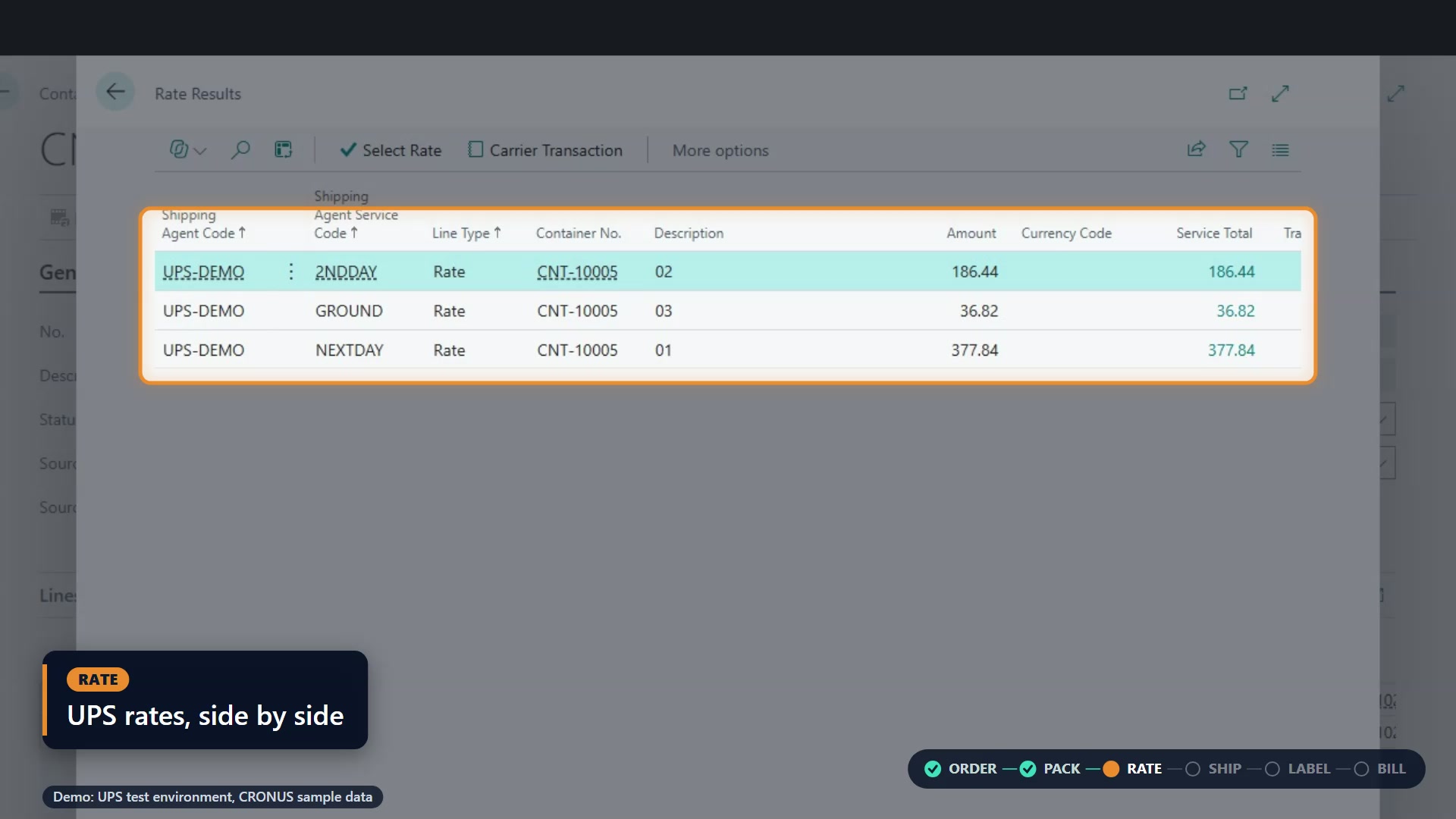
View carrier services and rates side by side in Business Central, then select the service that fits your shipment.
Booking & Tracking Numbers
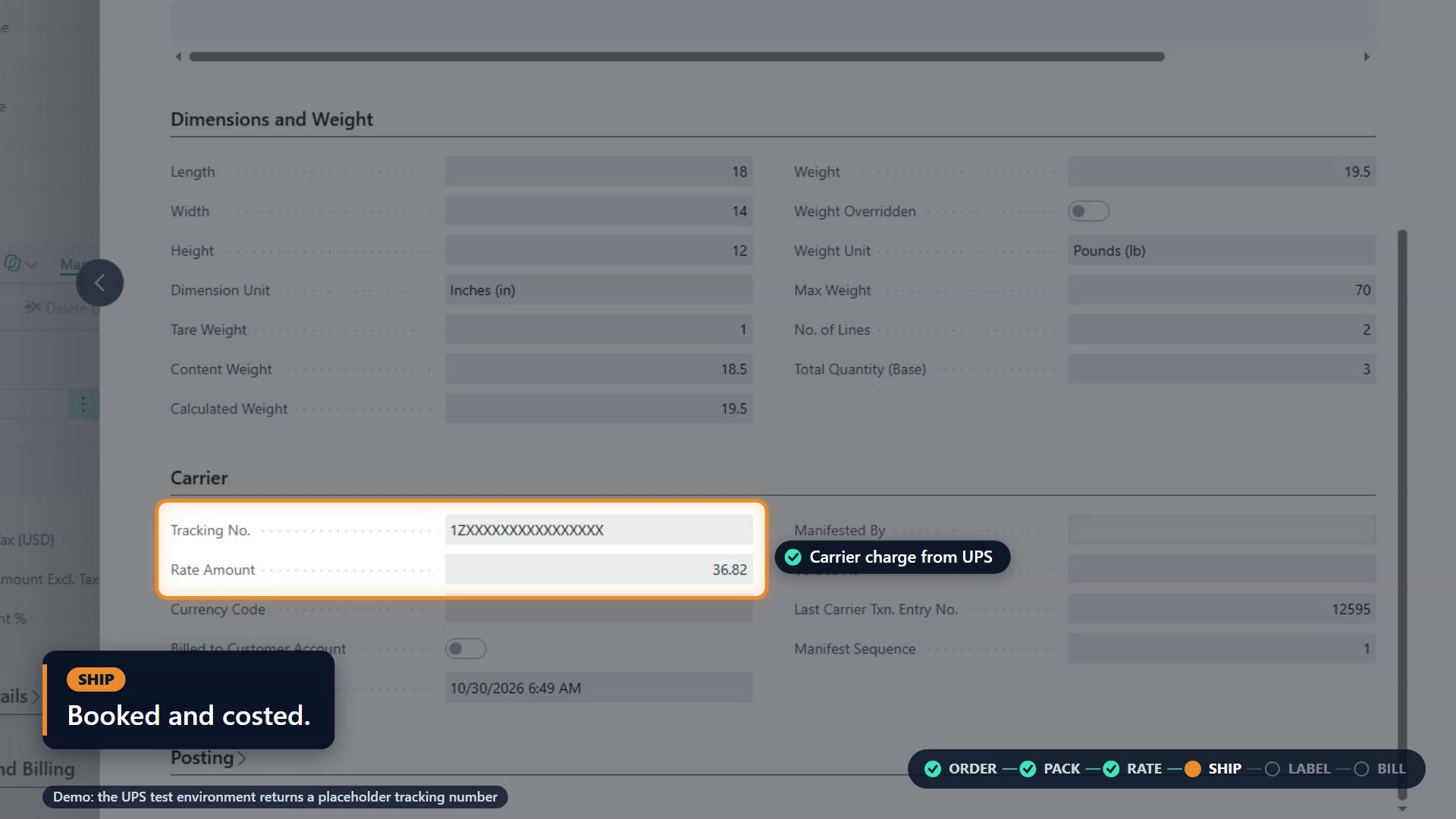
Manifest the shipment and bring the carrier’s tracking number and shipping charge back to the container.
Automatic Label Generation
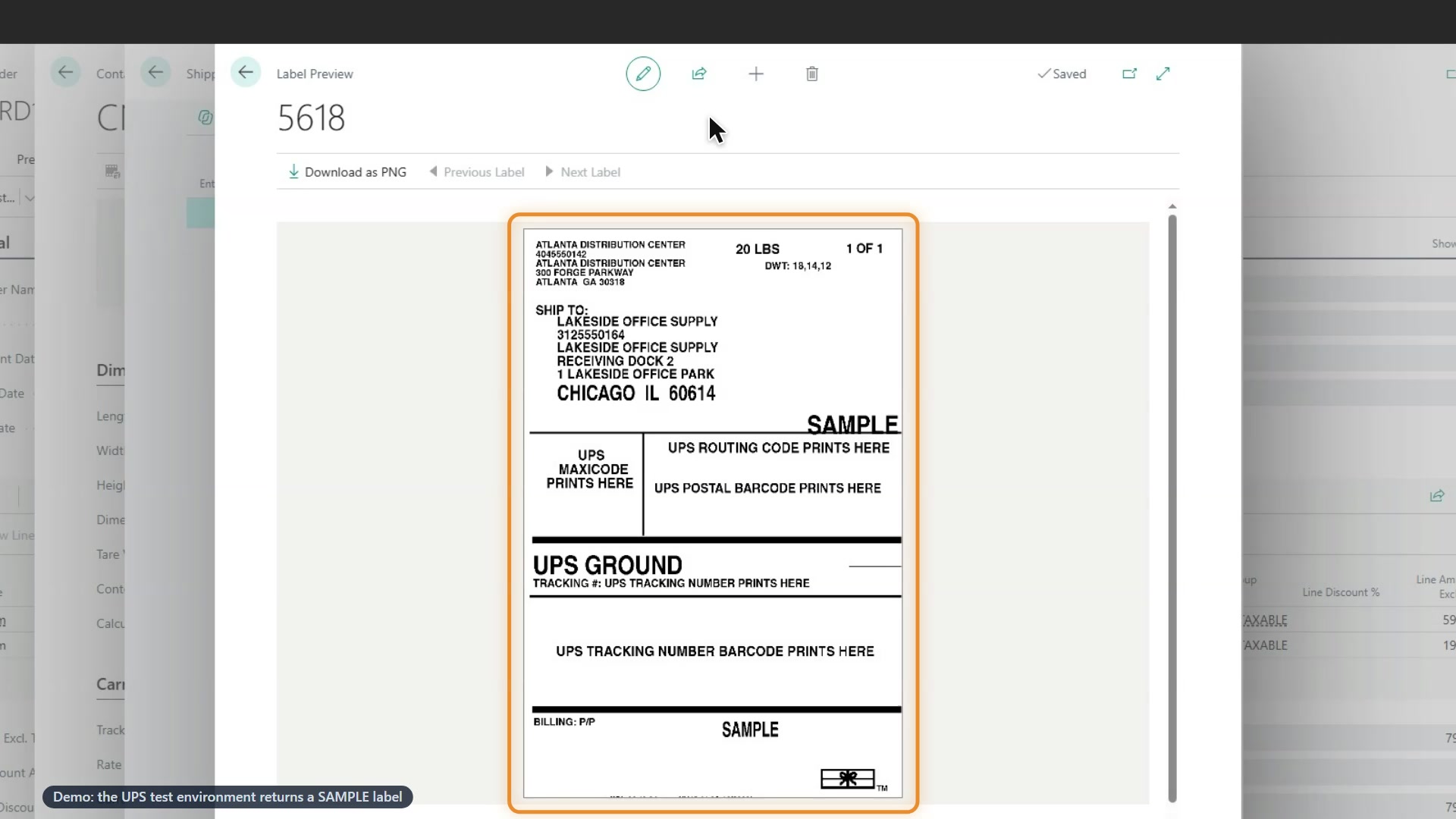
Create carrier labels with the shipment. Preview ZPL labels in Business Central, download a PNG, or download the carrier-provided label file.
Freight Charges on the Order
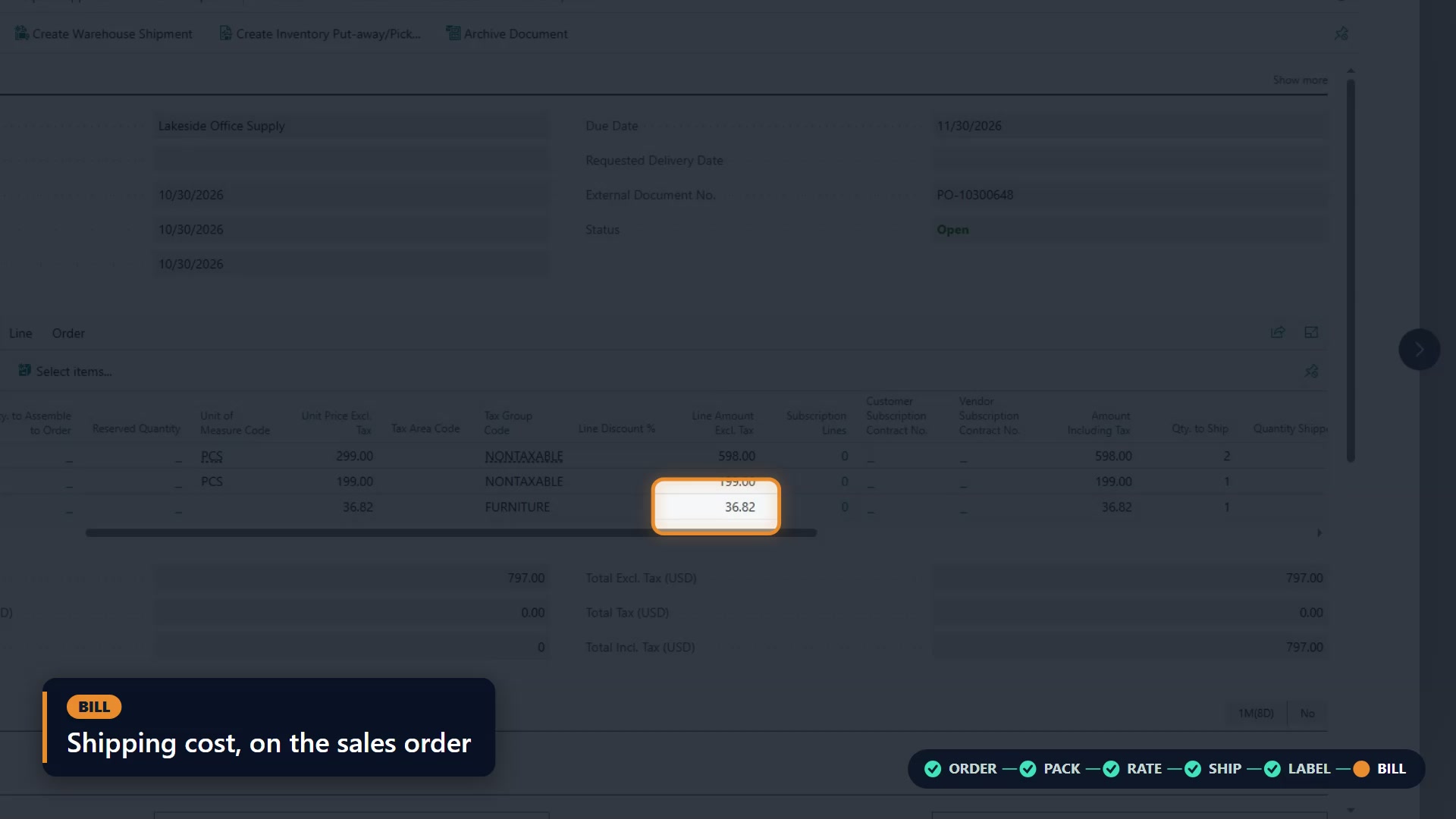
Apply the shipment’s cost to a freight charge line on the sales order, ready for invoicing.
Plan Your Shipping Workflow
Discuss your carriers, service levels, and label requirements with FRT Forge to define the right SHP setup for your Business Central operation.
- See SHP in Action
Inside Business Central, Exactly Where You Work
Follow a sales order through packing, rate selection, shipment booking, label creation, and freight billing in this 1:44 product walkthrough.
Read the demonstration transcript
Rate Shopping in Action
Compare carrier rates without leaving Business Central
Compare UPS and FedEx services in one rate-shopping view. Review price, delivery timing, and charge details, then apply your selected service to the closed containers—all inside Business Central.
Read the rate-shopping video transcript
One shipment. Which carrier? Which service?
Separate tabs for each carrier. Retype. Compare. Key it back.
Freight Forge SHP, now with Rate Shopping.
From a closed container, click Rate Shop. SHP asks every active carrier for its rates.
UPS and FedEx, one list, cheapest on top. Best price is flagged. So is Fastest, with its delivery date. Transit days become delivery dates.
Move down the list, and Charges follows, with its rate lines.
When a service returns no rate, you see which one, and the carrier's reply.
Choose on price, or delivery needs. Select Rate, and the closed containers carry that service.
Back on the container, it's already set. Nothing keyed back.
Ask, compare, select. All in Business Central.
Compare carriers without leaving Business Central. Freight Forge SHP.
- The Shipping Workflow
From Sales Order to Freight Charge
Your sales order already has the details. SHP carries them through the shipping workflow, then brings the carrier charge back where your finance team can use it.
- 01 / PACK
Pack Orders & Calculate Weight
Pack directly from the sales order. SHP calculates the shipment’s weight from the contents and the box, so packaging is part of the total.
- Start with the order’s ship-to details
- Pack the quantities you’re shipping
- Include the box’s tare weight
- 02 / RATE
Compare Carrier Rates
Open Rate Shop to see service options and carrier charges side by side. Select the service that fits the shipment and your delivery promise.
- Compare rates in Business Central
- Choose a service from the results
- Carry the selection into the shipment
- 03 / SHIP
Book Shipments & Capture Tracking
Manifest the shipment with the carrier. The tracking number and carrier charge return to the shipping container in Business Central.
- Book from the shipping container
- Capture the tracking number
- Keep the carrier charge with the shipment
- 04 / LABEL
Preview & Download Shipping Labels
The shipment creates the carrier label. Preview active ZPL labels inside Business Central and download a PNG, or download PDF and PNG label files supplied by the carrier.
For direct printing to a supported warehouse label printer, explore LabelLink for Business Central.
- Create the label with the shipment
- Preview without opening another tab
- Download a PNG from the label preview
- 05 / BILL
Apply Freight Charges to Sales Orders
Apply Freight Charge brings the shipping cost onto the sales order as a freight charge line, ready for invoicing.
- Apply the charge from the sales order
- Carry the shipment cost into a freight line
- Keep shipping and invoicing connected
- FAQs
SHP for Business Central FAQs
Get to know SHP for Business Central. Have a specific workflow in mind? Chat with our team.
What is Freight Forge SHP for Business Central?
SHP, pronounced “ship,” is FRT Forge’s packing and shipping extension for Microsoft Dynamics 365 Business Central. It brings order packing, carrier rate comparison, shipment booking, label creation, and configured freight charges into the Business Central workflow. Contact FRT Forge to confirm carrier availability and review your shipping scenarios.
Does the shipping team need a separate portal?
The shipping workflow runs inside Business Central. Your team works from the sales order and shipping container to compare rates, book shipments, preview labels, and apply freight charges.
Can we add the shipping cost to the sales order?
Yes. Apply Freight Charge adds the shipment’s cost to a freight charge line on the sales order, ready for invoicing.
How does SHP reduce manual shipping work?
SHP uses the sales order’s shipping details and calculates shipment weight from packed items and the box. Your team can compare rates, book the shipment, and preview its label inside Business Central. Tracking and carrier charges return to the shipment, and Apply Freight Charge carries the shipping cost onto the sales order for invoicing.
Is there also an SHP product for Finance & Supply Chain?
Yes. FRT Forge also offers SHP for Dynamics 365 Finance & Supply Chain Management. Explore the Finance & Supply Chain product ↗
- Get In Touch With Us
Start Shipping Smarter with SHP for Business Central
See how your team can take a sales order from packing to freight billing in one connected workflow.
Get started with SHP for Business Central
Bring your carrier accounts and shipping workflow together inside Business Central. SHP is designed for Business Central online, version 29.0 or later, with API-enabled carrier accounts and a FRT Forge licence for carrier rating and shipment booking.
Contact us for pricing and licensing, and to confirm availability for your carriers and shipping scenarios. Cloud Print is a separate optional app.