- Dispatch & Deliver · Last-mile delivery
Dispatch & Deliver: Last-Mile Delivery for Dynamics 365
FRT Forge Dispatch & Deliver connects branch dispatch, load checks, mobile driver tasks, electronic proof of delivery, and customer tracking for distributors using Microsoft Dynamics 365 Finance & Supply Chain Management. Keep Dynamics 365 as your system of record while giving each team a clear delivery workflow.
- Built for Your Delivery Day
From Branch Dispatch to the Customer’s Door
A Clear View of the Day
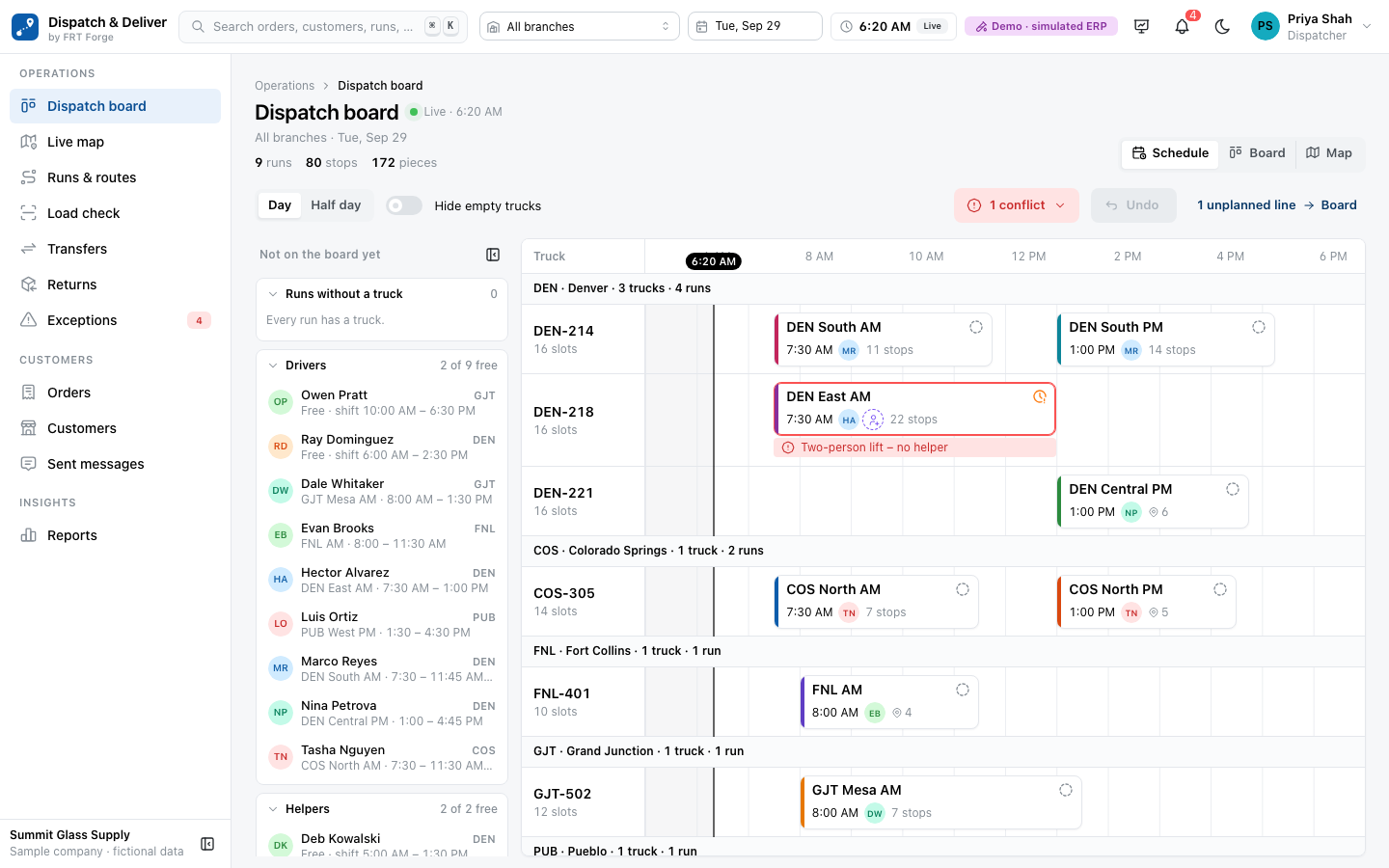
See trucks, drivers, and runs on a branch schedule. Surface conflicts and see what is holding up departure.
Load Checks Before Departure
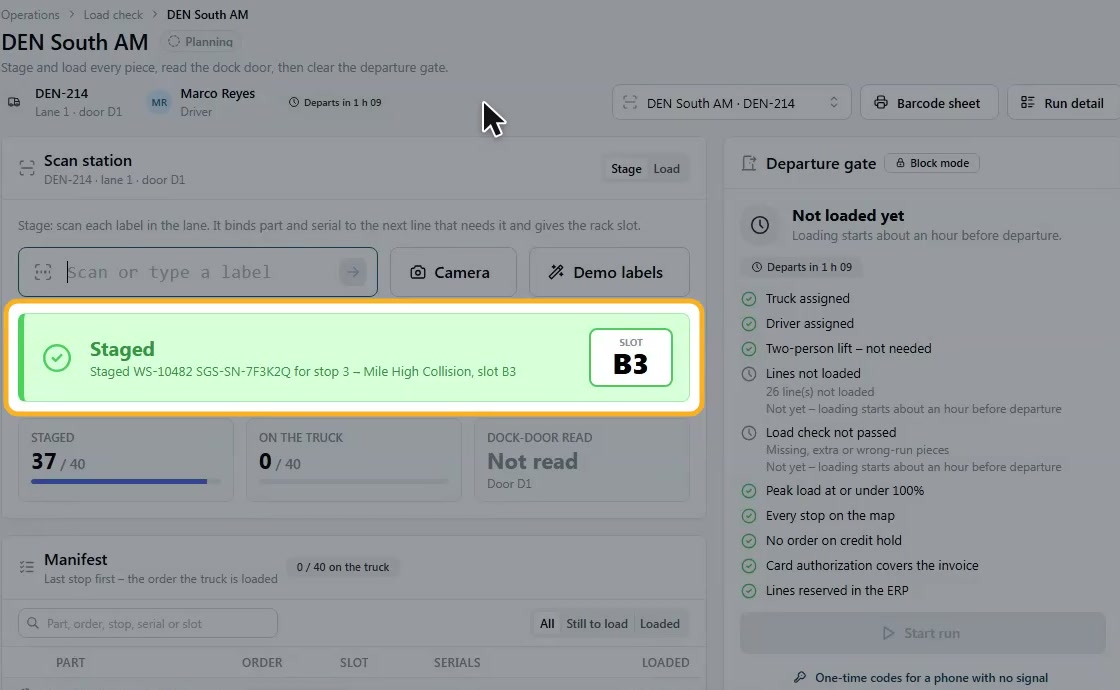
Check items against the manifest. Catch missing pieces and wrong-truck items before the run leaves.
An App for the Driver
Bring stops, scanning, and delivery tasks onto a phone. Designed to work offline and sync when the signal returns.
Proof at the Door
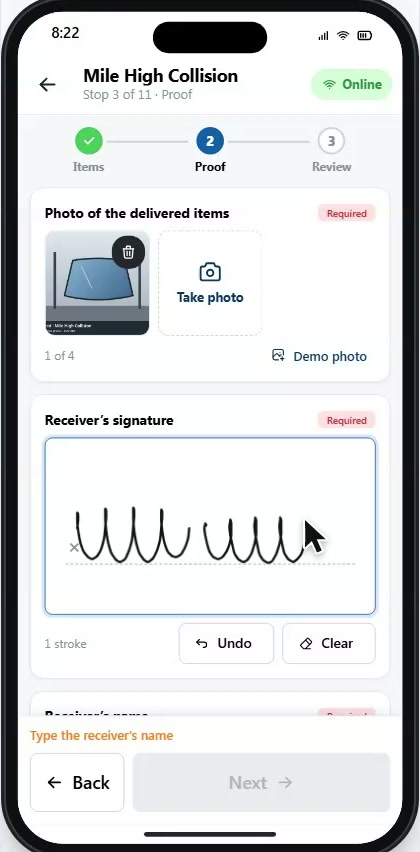
Record delivered quantities, scan serials at handoff, and collect a photo, signature, and receiver name.
Customer Delivery Visibility
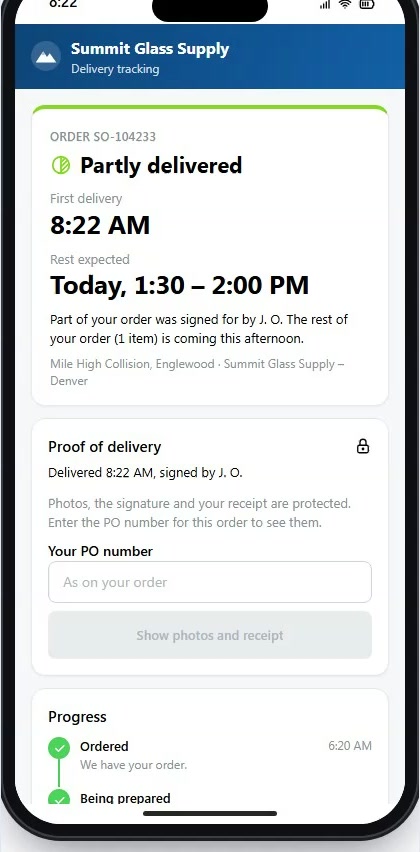
Give customers a tracking page with delivery status, an arrival window, and proof of delivery.
Dynamics 365 at the Center
Keep Dynamics 365 as your system of record, with a delivery workflow designed to return delivery facts and proof.
- See Dispatch & Deliver in Action
Follow a Delivery from Plan to Proof
See how the office console, driver app, and customer tracking page work together in this short product tour.
Follow a delivery from branch planning to proof at the customer’s door. This product tour shows schedules, load checks, driver tasks, photo and signature capture, and customer delivery updates. Dispatch & Deliver connects last-mile delivery with Microsoft Dynamics 365 Finance & Supply Chain Management.
Read the video transcript
Every delivery has a promise. The right order. The right truck. The right customer.
But a busy delivery day brings moving parts. Changing runs. Loading checks. And customers waiting for an update.
Meet Freight Forge Dispatch and Deliver. Last mile delivery, built for Dynamics three sixty five distributors.
Start with the schedule. See your trucks, drivers, and runs in one place. Spot conflicts before they become delays.
At the dock, check the load against the manifest. Catch missing pieces and items on the wrong truck before the run leaves.
Give drivers their stops and delivery tasks on a phone. The app is designed to keep working when the signal drops.
At the customer’s door, scan the serial number. Match the item to the delivery and record what actually arrived.
Capture a photo, a signature, and the receiver’s name. Keep the delivery proof together.
A customer tracking page brings the delivery window, status, and proof into one place.
Keep Dynamics three sixty five as your system of record, with a delivery workflow designed to bring back quantities and proof of delivery.
Plan. Load. Deliver. Prove. One connected delivery workflow.
Request a walkthrough of Freight Forge Dispatch and Deliver.
Planning your delivery workflow? Read the Dynamics 365 last-mile delivery guide.
- One Delivery Workflow
Plan. Load. Deliver. Prove.
Built for wholesale distributors that run their own trucks—from auto glass and auto parts to building products. Give each team a clear view of the next step.
- 01 / PLAN
See the Day Before It Gets Away
Bring trucks, drivers, and runs into one schedule. See departure times and conflicts in context, so dispatchers can focus on the runs that need attention.
- Plan by branch and run
- See driver and truck assignments
- Identify scheduling conflicts
- 02 / LOAD
Catch the Wrong Load at the Dock
Check staged and loaded items against the manifest. A failed load check can block departure until the problem is resolved.
- Check the manifest before departure
- See missing or wrong-run items
- Keep loading and dispatch connected
- 03 / DELIVER
Know What Arrived—and Who Received It
Give drivers a clear handoff workflow: scan the serial, record delivered quantities, and capture the receiver’s proof of delivery.
- Confirm the item at handoff
- Capture a photo and signature
- Keep proof with the delivery
- 04 / KEEP INFORMED
Give Customers a Clear Delivery Update
A customer tracking page puts the delivery status, arrival window, and proof together. Keep customers informed as the delivery progresses.
- Share the delivery window
- Show the current status
- Make delivery proof accessible
Keep Dynamics 365 as Your System of Record
Dispatch & Deliver gives your team purpose-built screens for planning, loading, and delivery. Dynamics 365 stays at the center of your customer, inventory, and financial records.
The integration is designed to return delivered quantities and proof of delivery to Dynamics 365. In a walkthrough, we’ll review the posting workflow and the fit for your ERP setup.
- Your Questions, Answered
Explore the Fit for Your Operation
Tell us about your branches, fleet, and delivery workflow. Request a walkthrough.
What does Dispatch & Deliver do?
Dispatch & Deliver is FRT Forge’s last-mile delivery solution for distributors using Dynamics 365 Finance & Supply Chain Management. It connects branch planning, load validation, mobile driver execution, electronic proof of delivery, and customer delivery visibility.
Is Dispatch & Deliver available for customers?
Yes. Dispatch & Deliver is available now. Book a product walkthrough and talk with our team about pricing, setup, and deployment for your operation.
Does Dispatch & Deliver include a driver app?
Yes. The mobile driver workflow brings together stops, item and serial scanning, delivered quantities, and photo and signature capture. Drivers can keep delivery tasks available offline and synchronize when connectivity returns.
Does this work with Business Central?
Dispatch & Deliver is designed for Dynamics 365 Finance & Supply Chain Management. For parcel shipping inside Business Central, explore SHP for Business Central.
How do we discuss pricing and deployment?
Contact us for pricing and a walkthrough. We will review your branches, fleet, devices, and Dynamics 365 setup with you. Microsoft licensing requirements depend on your agreement and should be confirmed with your licensing partner.
How is Dispatch & Deliver different from SHP and Carrier Portal?
Choose Dispatch & Deliver for your delivery runs and driver workflow. Choose SHP for parcel rates, labels, and shipment tracking. Choose Carrier Portal for third-party carrier self-service, including shipments, delivery documents, dock appointments, and invoice information.
- Let’s Talk About Your Delivery Day
See Dispatch & Deliver for Yourself
Bring your delivery and branch requirements. See how Dispatch & Deliver connects planning, loading, driver workflows, and proof of delivery, and discuss pricing and implementation with our team.